If you want to create a website but don’t know how to code, you may have heard of WordPress.
WordPress is a popular content management system (CMS) that allows people and businesses to create, manage and publish content on websites without having to build everything from scratch using code.
It can be used to create many different types of websites, including:
- Business websites
- Blogs
- Online portfolios
- News websites
- Educational websites
- E-commerce stores
- Membership websites
- Personal websites
One of the biggest advantages of WordPress is its flexibility. A beginner can start with a simple website and gradually add more features as the business or project grows.
How Does WordPress Work?
At a basic level, a WordPress website consists of several important components.
Domain Name
Your domain is your website’s address on the internet.
For example:
People type your domain into their browser to access your website.
Web Hosting
Web hosting is where your website’s files and database are stored. When someone visits your website, the hosting server delivers the website’s content to their browser.
WordPress
WordPress provides the system you use to manage your website.
Through the WordPress dashboard, you can create pages, publish blog posts, upload images, manage menus and install additional functionality.
Think of it this way:
Domain = Your website’s address
Hosting = The space where your website lives
WordPress = The system you use to manage it
WordPress.com vs WordPress.org
One of the first things beginners should understand is that WordPress.com and WordPress.org are different services.
WordPress.com
WordPress.com is a hosted platform. Much of the technical infrastructure is managed for you.
It can be convenient for people who want a simpler setup.
WordPress.org
WordPress.org provides the WordPress software that you can install on your own web hosting.
This option generally gives you more control over your website, themes, plugins and customization.
For businesses and people who want greater flexibility, self-hosted WordPress is often an attractive option.
Before starting, it is important to understand which WordPress option fits your needs.
What Is the WordPress Dashboard?
The WordPress dashboard is the administrative area where you manage your website.
After logging in, you can access tools for managing different parts of your site.
Common sections include:
- Posts
- Pages
- Media
- Comments
- Appearance
- Plugins
- Users
- Settings
The exact options you see can vary depending on your WordPress version, theme and installed plugins.
For beginners, the dashboard may look complicated at first, but most website management tasks become easier with practice.
Pages vs Posts in WordPress
Another important concept is understanding the difference between pages and posts.
Pages
Pages are generally used for relatively permanent website information.
Examples include:
- Home
- About Us
- Services
- Contact
- Privacy Policy
Posts
Posts are generally used for regularly published content such as blog articles and news updates.
For example, a digital marketing website might publish posts such as:
“10 SEO Mistakes Beginners Should Avoid”
or
“SEO vs Google Ads: Which One Should Your Business Choose?”
Posts can be organized using categories and tags, depending on how you structure your website.
What Are WordPress Themes?
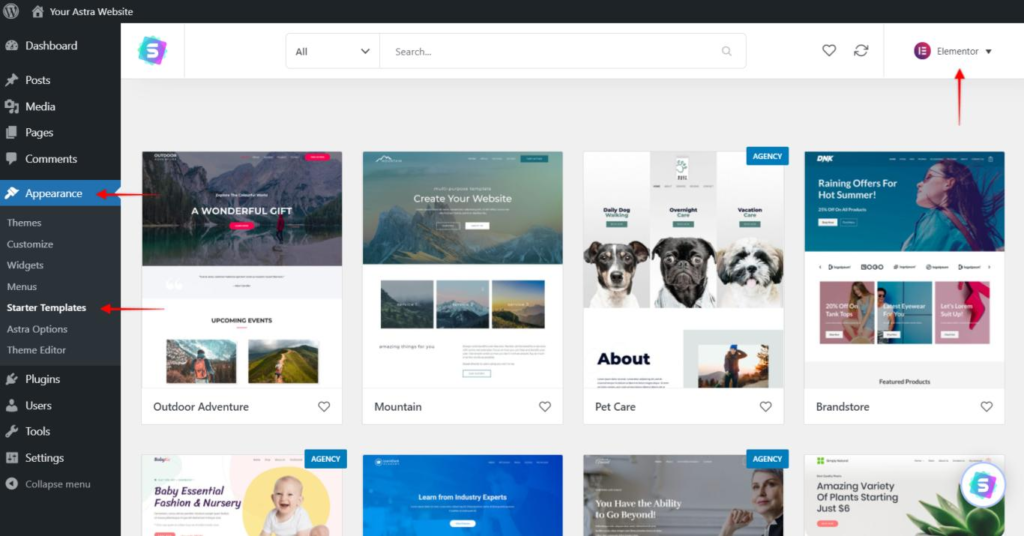
A WordPress theme controls much of the visual appearance and layout of your website.
It can influence:
- Fonts
- Colors
- Page layouts
- Header
- Footer
- Menus
- Blog design
- Overall appearance
There are thousands of WordPress themes available, ranging from simple blog designs to sophisticated business and e-commerce layouts.
When choosing a theme, don’t select one only because it looks attractive. Consider:
- Mobile responsiveness
- Speed
- Customization options
- Accessibility
- Compatibility with important plugins
- Regular updates
- Support
A clean, fast and easy-to-use design is usually more valuable than a website filled with unnecessary visual effects.
What Are WordPress Plugins?
Plugins are one of the features that make WordPress extremely flexible.
A plugin can add functionality to your website without requiring you to develop that functionality completely from scratch.
Depending on the plugin, you can add features such as:
- Contact forms
- SEO tools
- Security features
- Website backups
- Analytics integration
- E-commerce functionality
- Caching
- Social media integration
For example, an e-commerce business can use a plugin to add product pages, shopping-cart functionality and checkout features.
However, installing too many plugins can create maintenance, compatibility and performance issues. It is better to install only plugins that your website actually needs.
What Is Elementor?
If you have worked with WordPress, you may have heard about Elementor.
Elementor is a visual website builder that allows users to design pages using a drag-and-drop interface.
Instead of editing website code directly, users can work with elements such as:
- Headings
- Images
- Buttons
- Videos
- Columns
- Sections
- Forms
This can make page creation much easier for beginners.
For example, you could create a landing page with:
Headline → Image → Benefits → Testimonials → Lead Form → Call-to-Action
and arrange these elements visually.
Elementor can therefore be useful for marketers and small-business owners who want to create and edit website pages without depending on a developer for every small change.
Why Is WordPress Useful for Digital Marketers?
WordPress is particularly useful for digital marketers because a website is often the central part of a digital marketing strategy.
A marketer can use a WordPress website for:
SEO
Publish optimized content and create pages targeting relevant search queries.
Content Marketing
Create blogs, guides, case studies and other useful resources.
Lead Generation
Add contact forms, landing pages and calls-to-action.
Analytics
Connect analytics and other marketing tools to understand website performance.
Social Media
Share website content across social platforms and drive visitors back to the website.
This makes WordPress a valuable skill for people learning digital marketing.
Benefits of WordPress
There are several reasons why WordPress is popular.
1. Easy to Start
Beginners can create and manage websites without being expert programmers.
2. Flexible
WordPress can be used for simple blogs as well as more complex websites.
3. Customizable
Themes, plugins and page builders provide many customization options.
4. Suitable for Content Marketing
Publishing and managing blog content is one of WordPress’s core strengths.
5. Large Ecosystem
There are many themes, plugins, tutorials, developers and resources available.
6. Scalable
A website can start small and add features as its requirements grow.
Things to Keep in Mind
Although WordPress is powerful, it is not completely maintenance-free.
Website owners should pay attention to:
- WordPress updates
- Theme updates
- Plugin updates
- Website security
- Backups
- Website speed
- Mobile responsiveness
- Broken links
- SEO
- Regular content updates
Before making major changes, keeping a recent backup is a good practice.
Security is particularly important because outdated software or poorly maintained plugins can create vulnerabilities.
How to Start a WordPress Website
For a beginner, the process can be simplified into these steps:
Step 1: Choose a domain name.
Step 2: Select a reliable web hosting provider.
Step 3: Install WordPress.
Step 4: Choose an appropriate theme.
Step 5: Create important pages such as Home, About, Services and Contact.
Step 6: Install only the plugins you need.
Step 7: Customize your website design.
Step 8: Make sure the website works well on mobile devices.
Step 9: Add useful content.
Step 10: Connect relevant analytics and SEO tools.
Step 11: Test the website before promoting it.
Conclusion
WordPress is more than just a platform for writing blogs. It is a flexible content management system that can help individuals, marketers and businesses build and manage websites.
Its combination of themes, plugins and visual page builders makes it possible for beginners to create professional-looking websites without needing advanced coding knowledge.
For someone learning digital marketing, understanding WordPress can be especially valuable because websites, SEO, content marketing, lead generation and analytics are closely connected.
You don’t need to become a professional web developer to use WordPress effectively. Start with the basics, learn how pages and posts work, understand themes and plugins, and gradually explore features such as SEO, landing pages and analytics.
In simple terms: WordPress gives you the tools to build your online presence, while digital marketing helps people discover and engage with it.